

“AI Disruption” Publication 9800 Subscriptions 20% Discount Offer Link.

Most people use Claude Code the same way they use a regular chat box.
Open it, describe what they want, wait for the code, then close it.
This only utilizes about 10% of its capabilities.
The real difference isn’t how well you write prompts, but whether you’ve built a persistent configuration system in your project. This allows Claude to understand your entire codebase, follow your standards, and operate within your defined boundaries from the very first launch.
The .claude folder is the carrier of this system.
Below is my configuration, along with practical examples and explanations of how to use this folder. I believe it will greatly help you use Claude Code more efficiently.
Two Directories
The .claude folder actually consists of two directories with completely different responsibilities:
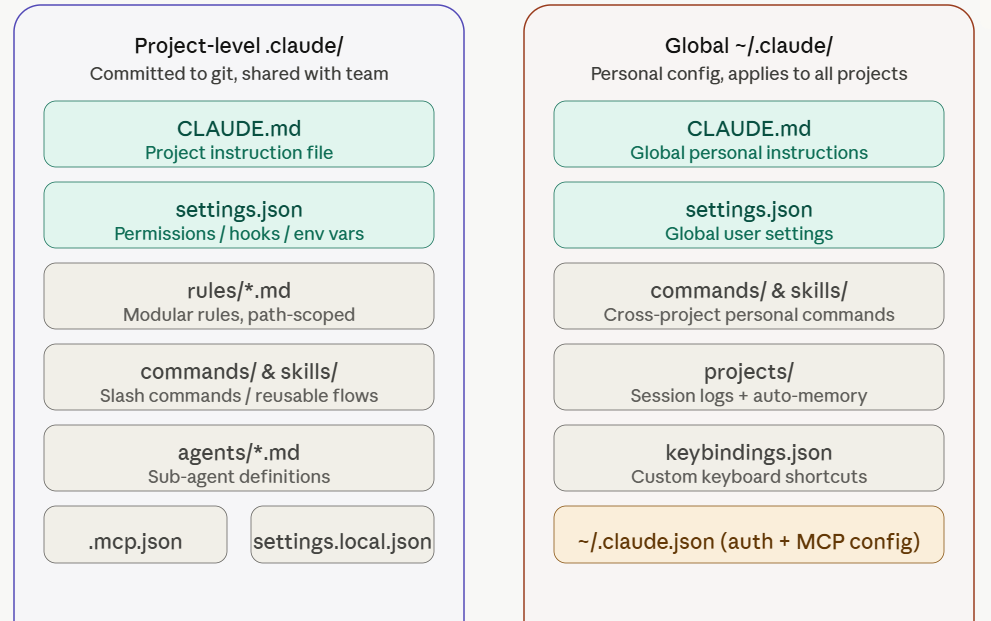
Project-level .claude/
Placed in the root of your repository and committed to git. All team members share the same configuration.
This is where you put team-agreed coding styles, permission boundaries, and shared slash commands.
Global ~/.claude/
Located in your user home directory. It applies to you personally and affects all projects.
This is where you store personal preferences, such as your usual prompting style, personal shortcuts, and cross-project general rules.
